10 Best Practices for Incident Communication
Practical incident communication best practices that reduce support load, build trust, and turn outages into proof your team has its act together.
Your monitoring fires at 3:12 AM. The payments service is returning timeouts. The on-call engineer wakes up, opens a laptop, starts investigating. Thirty minutes later the fix is in and everything's green again. Total customer impact: about 25 minutes of degraded checkout performance.
But here's the thing. Nobody told the customers. The status page still says "All systems operational." The first update goes out four hours later in a morning standup Slack message that someone screenshots and posts on Twitter. By then, your biggest enterprise customer has already emailed their account manager asking why they had to find out about a payments outage from social media.
The outage was 25 minutes. The communication failure lasted four hours and counting. That's the gap this post is about.
Here are ten practices that close that gap. They're not theoretical. They're what good incident response teams actually do, every time, regardless of severity.
1. Acknowledge fast -- within five minutes
The single most important thing you can do during an incident is acknowledge it quickly. Not fix it quickly (though that's nice too). Acknowledge it. Tell people you know something's wrong.
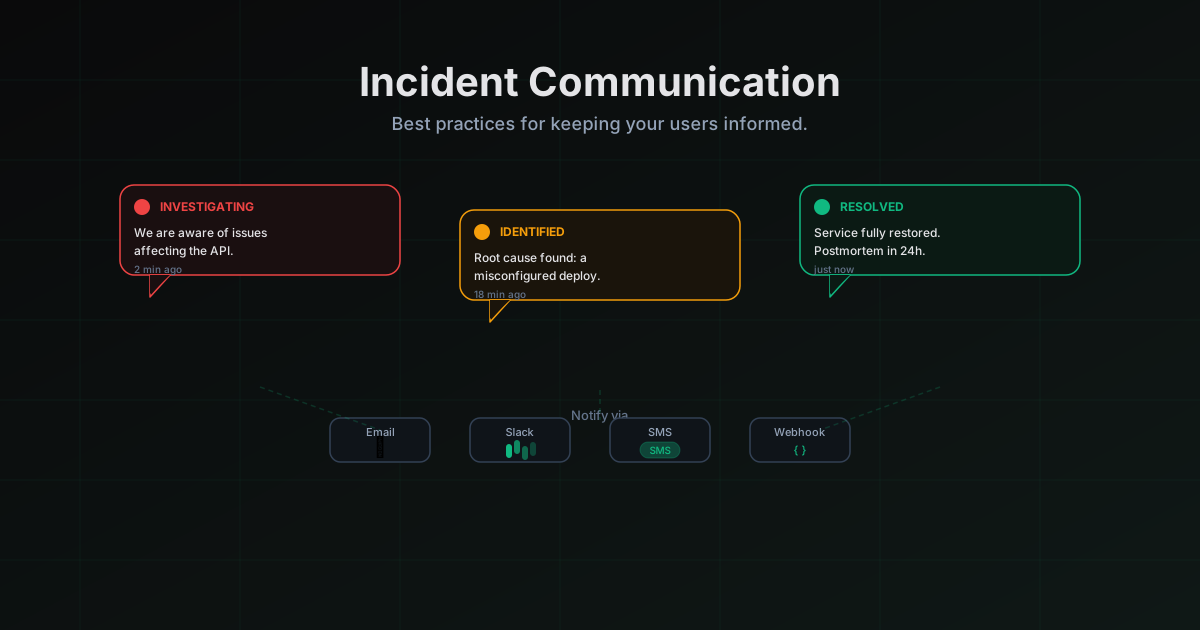
Five minutes is the target. Not five minutes to have a root cause. Not five minutes to have a fix. Five minutes to post something like: "We're seeing elevated error rates on the payments API. Investigating now. Next update in 10 minutes." That's it. One sentence of substance, one sentence of commitment.
Why five minutes? Because that's roughly the window before customers start filling the information vacuum themselves. After five minutes of silence, support tickets start rolling in. After ten, someone tweets about it. After fifteen, your sales team is fielding panicked emails from prospects who were mid-trial. Every minute of silence costs you multiples in reactive communication later.
The trick to hitting five minutes consistently is not to require sign-off before posting. If the on-call engineer has to wake up a manager, draft something in a Google Doc, get it reviewed by legal, and then post it, you'll never hit five minutes. Give your on-call the authority and the tooling to post immediately. If you're using LiveStatus, your on-call can push a status update from their phone before they've even opened a laptop. That matters at 3 AM.
2. Be specific about impact, not vague
"We are currently experiencing issues that may impact some users" is the worst sentence in incident communication. It says nothing. It helps no one. Customers read it and correctly assume you either don't know what's happening or you're hiding something.
Compare that with: "Checkout is failing for approximately 30% of customers in the EU region. Customers in the US and APAC are not affected. The issue started at 14:23 UTC." Now the customer knows whether they're affected. The EU customer knows their checkout failures aren't a local problem. The US customer knows they can stop worrying. Your support team can point people to this update instead of individually triaging each ticket.
Being specific requires knowing what's actually happening, which means your observability has to be good enough to tell you. But even partial specificity beats total vagueness. "The API is returning 500 errors for about 40% of requests" is better than "some users may experience issues." Name the component. Estimate the scope. Give a start time. Your customers are adults who can handle specifics. What they can't handle is being patronized with corporate fog.
3. Set expectations for the next update
Every incident update should end with a time commitment for the next one. "Next update in 15 minutes." "We'll update again by 10:00 UTC or sooner if anything changes." This does two things: it tells the customer when to check back, and it creates accountability for your team to actually follow through.
The cadence depends on severity. For a major outage affecting core functionality, update every 5 to 10 minutes. For a degradation that's annoying but not blocking, every 15 to 30 minutes is reasonable. For a minor issue you're monitoring, once an hour is fine. The key is to state the interval explicitly so customers aren't guessing.
If you commit to updating in 15 minutes and you don't have new information when the timer goes off, update anyway. "Still investigating. The team is focused on [specific thing they're looking at]. Next update in 15 minutes." That's a valid update. It tells the customer a human is still working on this. Silence after a promised update time is worse than the original silence, because now you've broken a commitment on top of having an outage.
4. Use plain language, not jargon
Your status page audience is not your SRE team. It includes product managers checking whether the demo they're about to give will work. It includes the CEO of your customer's company, who got a panicked Slack message and is now looking at your status page for the first time. It includes a non-technical founder evaluating your product during a free trial.
Write for all of them. "A misconfigured BGP route advertisement caused our edge nodes to drop packets" is accurate but useless to 90% of your audience. "A networking configuration error is causing our service to be unreachable for some users" communicates the same thing to everyone.
This doesn't mean dumbing things down. It means choosing words that convey meaning to the broadest possible audience. Say "our database" instead of "the primary RDS instance." Say "the checkout process" instead of "the payment gateway integration layer." You can include technical details in a follow-up section or in the postmortem, but the primary status update should be readable by anyone who uses your product. A good litmus test: if your least technical customer would need to Google a term in your update, rewrite it.
5. Separate what you know from what you're investigating
During an active incident, there's enormous pressure to explain what's happening. The problem is that you often don't know yet. The temptation is to either say nothing (bad) or to speculate (also bad, for different reasons).
The solution is to explicitly separate confirmed facts from open questions. "What we know: the payments API started returning errors at 14:23 UTC. Approximately 30% of checkout requests are failing. The issue is isolated to our EU infrastructure. What we're investigating: whether this is related to the database migration that ran at 14:15 UTC. We have not confirmed a root cause yet."
This format does something powerful. It shows customers that you have situational awareness (you know the scope, the timing, the affected region) while being honest about what you don't know yet. It also protects you from the very common failure mode of announcing a root cause prematurely, then having to walk it back when you discover the real cause is something else entirely. Nothing erodes credibility faster than "actually, it wasn't the thing we said it was."
6. Update regularly, even when nothing has changed
This one is counterintuitive. If nothing has changed, what is there to say? The answer is: there's plenty to say, because from the customer's perspective, silence means one of three things. You've forgotten about the incident. You've given up. Or your status page is broken too.
A simple "Still investigating. The team is reviewing database connection logs and has ruled out the recent deployment as a cause. No change in customer impact. Next update in 10 minutes." tells the customer three things: you're still working on it, you're making progress (you've ruled something out), and you'll be back soon.
The cadence of updates during an incident communicates how seriously you're taking it. Frequent updates signal urgency and attention. Long gaps signal either incompetence or indifference. Neither is true, but perception matters when your customers are waiting for a fix. If you're using a tool like LiveStatus that supports scheduled update reminders, set them. Don't rely on the on-call engineer to remember to post every 10 minutes while simultaneously debugging a production issue.
7. Post a root cause analysis after resolution
The incident isn't over when the fix goes in. It's over when you've published a root cause analysis (some teams call it a postmortem or an incident review) that explains what happened, why it happened, and what you're doing to prevent it from happening again.
A good root cause analysis has four parts. First, a timeline: what happened and when, in plain language. Second, the root cause: not "human error" (that's never a root cause, it's a cop-out), but the specific technical and process failures that allowed the incident to occur. Third, the immediate remediation: what you did to fix it. Fourth, the follow-up actions: specific, concrete changes you're making, with owners and timelines.
Publish the root cause analysis publicly on your blog or status page. This is where many teams chicken out, worrying that it makes them look bad. The opposite is true. A detailed, honest postmortem makes you look like a team that takes reliability seriously and learns from failures. Cloudflare, GitLab, and Google all publish detailed postmortems, and they're more trusted for it. Your customers already know you had an outage. The postmortem is your chance to show them what you learned from it. Link it from your status page history so customers can always find it.
8. Use multiple channels
Your status page is the source of truth. But not every customer checks your status page. Some don't even know it exists. Multi-channel communication ensures that the people who need to know about an incident actually find out.
At minimum, you should be communicating through your status page, email to affected customers, and whatever messaging platforms your customers use (Slack, Microsoft Teams, Discord). The status page is the canonical record. Email reaches people who aren't actively looking. Slack and Teams reach people in real time where they're already working.
The key is that all channels should point back to the status page as the source of truth. Your Slack message should link to the status page. Your email should link to the status page. This prevents the nightmare scenario where different channels have different information because someone updated one but forgot the other. LiveStatus handles this by pushing updates to subscribers via email and push notifications automatically when you update your status page, so you write the update once and it goes everywhere.
9. Have pre-written templates ready
When an incident starts, your on-call engineer is doing three things at once: diagnosing the problem, coordinating the response, and communicating with customers. That third task is critically important but it's also the one that gets dropped first under pressure, because it feels less urgent than actually fixing the thing.
Templates fix this. A pre-written template for the initial acknowledgment, for regular updates, and for the resolution notice means your on-call doesn't have to compose prose under pressure. They fill in the specifics (which component, what impact, what time) and post. The structure is already there.
Good templates include placeholders for: the affected component, the scope of impact, the start time, what's being done, and when the next update will come. They're written in plain language with the right tone already baked in. They're not generic corporate boilerplate. They're your team's voice, pre-loaded and ready to go. If your incident communication tool supports templates, build a library of them before you need them. The worst time to figure out what to write is during an outage.
10. Practice with game days
Everything above sounds straightforward when you read it on a blog post. Executing it at 3 AM with a sev-1 in progress and your phone blowing up is a different matter entirely. The gap between knowing what to do and actually doing it under pressure is enormous, and the only thing that closes it is practice.
Game days (also called incident drills, fire drills, or chaos engineering exercises) are simulated incidents where you practice the full response workflow, including communication. You inject a fake failure, page the on-call, and run through the entire process: detection, triage, status page updates, customer communication, escalation, resolution, postmortem. Everything except the actual broken production system.
The communication piece is the most underrated part of game days. Most teams practice the technical response but skip the customer communication. That's a mistake. The technical response is usually muscle memory for experienced engineers. The communication is where things fall apart, because it requires a different skill set (writing clearly under pressure, estimating impact quickly, coordinating across channels) that most engineers haven't practiced. Run the game day end-to-end. Post real updates to an internal test status page. Send real test emails. Practice the postmortem write-up. Do this quarterly, and when the real incident hits, your team will have done this before.
The common thread
All ten of these practices point at the same underlying principle: your customers' experience of an incident is shaped more by your communication than by the incident itself. A 15-minute outage with clear, frequent, honest updates is a non-event. A 15-minute outage with silence and vague updates is a trust crisis.
The good news is that incident communication is a skill, not a talent. It can be systematized, templated, practiced, and improved. The tools matter (a status page that's fast to update, multi-channel notifications, template support), but the habits matter more. Start with the five-minute acknowledgment rule and build from there.
Your next outage is coming. The question isn't whether you'll have one. It's whether your customers will come out of it trusting you more or less than they did before.
More posts
The Best BetterStack Alternative in 2026: LiveStatus
Looking for a BetterStack or Statuspage alternative? LiveStatus gives you beautiful status pages and uptime monitoring without the enterprise price tag.
Why Every API Provider Needs a Status Page
API providers without a status page are leaving developer trust on the table. Here's what a proper API status page does, what it covers, and why it reduces your support load while your incidents are still in progress.
How a Status Page Cuts Support Tickets by 40%
The math behind how a status page reduces support ticket volume during incidents. Email subscribers, SMS alerts, proactive communication, and why the ROI shows up in your support metrics within the first incident.