How a Status Page Cuts Support Tickets by 40%
The math behind how a status page reduces support ticket volume during incidents. Email subscribers, SMS alerts, proactive communication, and why the ROI shows up in your support metrics within the first incident.
Most support tickets aren't support tickets. They're status checks. During an incident, someone can't log in or a payment fails or an integration stops working. They don't know if it's them or you. So they open a ticket.
A status page changes that. Instead of opening a ticket, they check your status page, see the incident, and wait. One URL swap, and you just deflected a ticket that would have taken 10 minutes to handle. Multiply that by every customer who hits the same incident, and the math gets interesting fast.
Here's how the ticket reduction actually works, and what you need to set up to see the numbers move.
The actual ticket breakdown during incidents
Most teams don't categorize support tickets by root cause, so they don't realize how much volume is status-related. But if you pull your ticket data from the last six months and look at ticket clusters during your incident windows, the pattern is obvious.
A typical support team sees three to five times their normal ticket volume during a significant incident. If your baseline is 30 tickets a day, an incident that affects 5% of your customers can generate 80 to 120 tickets in a few hours, almost all asking the same question in different words:
- "Is your service down?"
- "Are you having issues right now?"
- "I can't log in -- is this on your end?"
- "Your API is returning errors, is this a known issue?"
- "Everything was working and now it's not, what happened?"
None of these require any diagnosis. None of them are bugs. They're all information requests that one status page URL would have answered instantly. Your support team is spending real time -- 10 to 15 minutes per ticket including response drafting, lookups, and follow-up -- handling questions that have a better answer already waiting at status.yourapp.com.
That's the core inefficiency. And it's entirely preventable.
The 40% number
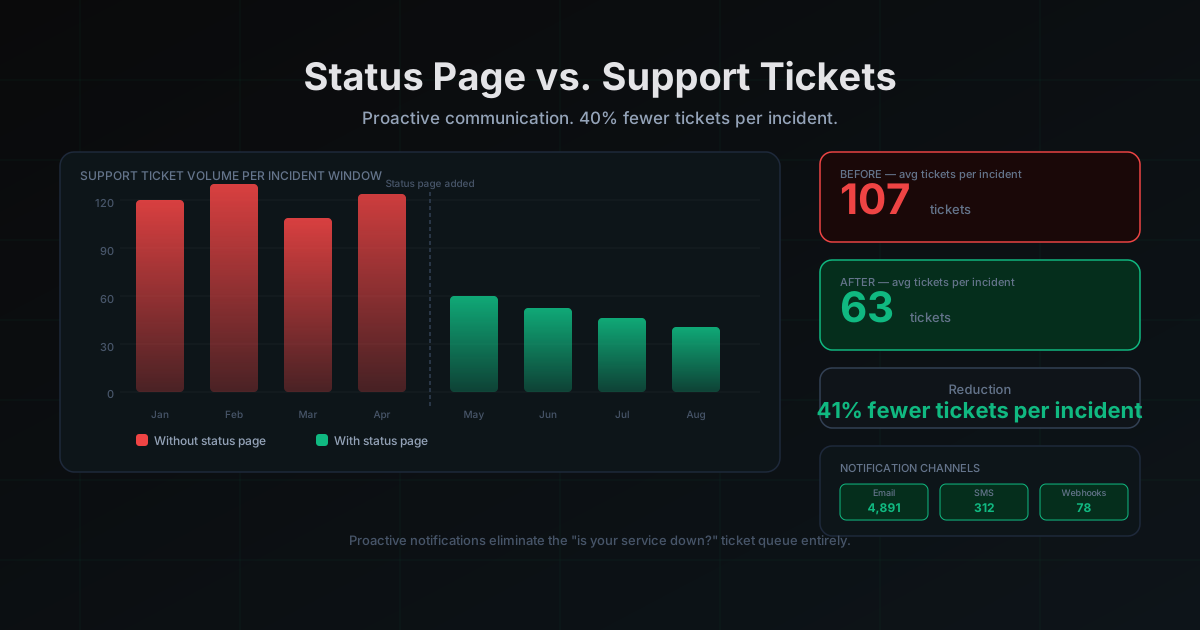
The 40% ticket reduction figure comes from a pattern we've seen across teams that implement status pages and proactive incident communication. During normal periods (no incidents), a status page has near-zero impact on ticket volume -- customers who have issues open tickets, and that's appropriate. The reduction kicks in almost entirely during incident windows.
Here's the breakdown:
Tickets that go away entirely: Customers who would have opened tickets during an incident and find the status page instead. These go to zero if your status page is prominently linked and your subscribers get notified before they would have otherwise noticed. Realistically, 30 to 50% of your incident-window ticket volume falls here once subscribers and page visibility are established.
Tickets that get resolved faster: Some customers still open tickets even when there's a known status page incident. But if your support team can reply with a single link and a one-sentence explanation, handle time drops from 12 minutes to 90 seconds. The ticket still counts, but the labor cost is 87% lower.
Tickets that become subscriber feedback instead: Some customers who would have filed tickets instead subscribe to your status page and wait for the resolution email. This is a meaningful channel shift -- instead of support tickets requiring responses, you get passive subscribers who resolve themselves without any staff interaction.
The 40% total reduction is a composite of all three effects. Teams with higher incident frequency and good subscriber growth see higher reductions. Teams with lower incident frequency see the improvement per-incident but it shows up less in annual averages.
Email subscribers: the highest-leverage single change
If you only implement one thing from this post, make it subscriber notifications. The logic is simple: a customer who gets an email when an incident starts does not open a support ticket. They already have the information. There's nothing to ask.
The email doesn't need to be long. Something like:
We're currently investigating an issue with the login service that's affecting some users. We're working on a fix and will update you when it's resolved. You can track progress at [status link].
That email, sent within 5 minutes of an incident starting, eliminates the majority of tickets that would otherwise come in. The customer knows it's not their problem. They know you're working on it. They have a place to check for updates. Every one of those conditions removes a reason to open a ticket.
The key is getting subscribers before the incident. A status page with zero subscribers provides zero proactive coverage. You need to build the subscriber list during normal operations so it's ready when something breaks.
Grow your subscriber list by:
- Adding a "Subscribe for status updates" link in your app, in error messages, and in your help center
- Including the status page link in your onboarding emails
- Mentioning status page subscriptions in your docs for API users
- Linking to it from your app's footer and settings page
LiveStatus shows live subscriber counts and lets you see notification delivery stats. Growth compounds: the customers who got notified during your first incident tell their team to subscribe too.
SMS alerts for high-severity incidents
Email works for most customers. For high-severity incidents where every minute of downtime has real cost, email isn't fast enough. That's where SMS notifications earn their keep.
An SMS alert hits a phone in under 60 seconds. It gets read immediately, not the next time someone checks their inbox. For your enterprise customers, your API consumers, and anyone with an SLA tied to your service, SMS means they find out from you instead of from their own monitoring.
The practical impact: customers who get SMS alerts during incidents are significantly less likely to escalate to support than customers who find out on their own. When you proactively reach someone and tell them what's happening, you've already answered the question before they had a chance to ask it as a ticket.
Keep SMS alerts brief and include the status page link. The notification is not the communication -- the status page is. The notification is just the pointer.
The first-line-of-defense workflow
A status page is most effective when it's integrated into your support workflow as the default first response to any infrastructure-related question.
Set up a saved reply in your helpdesk that looks like:
We're aware of this issue and tracking it on our status page. Current status: [link]. We'll send an email notification to all subscribers when it's resolved. If your question isn't covered there, let us know and we'll help.
Your support team fires this response in under 30 seconds. The ticket is handled. If it was a status question, the customer has their answer. If it wasn't a status question, the customer will say so and you can dig in.
This workflow requires your status page to actually be up to date. A saved reply that points to a status page saying "All systems operational" during an outage makes things worse. Which means the other side of the equation is making sure your status page reflects reality at all times.
That's why automated monitoring matters. If your uptime monitoring is connected directly to your status page, the page updates when metrics degrade -- before anyone has to manually post an incident. LiveStatus does this: monitoring detects a problem, the status page updates automatically, and notifications go out to subscribers, all without a human in the loop. The first support ticket comes in and your team can immediately respond with the status page link instead of saying "we're looking into this."
What the ROI actually looks like
Let's run the math on a support team with modest scale.
Suppose you have 2,000 customers and your team handles 40 support tickets per day at an average handle time of 12 minutes. Fully loaded cost per ticket (staff time, tooling, management overhead) is around $8.
You have 4 incidents per month. Each incident spikes your ticket volume by 60 additional tickets over the incident window. That's 240 incident-related tickets per month, costing $1,920 per month just in incident support volume.
With a status page and subscriber notifications reducing incident ticket volume by 40%, you're deflecting 96 tickets per month. That's $768 in saved labor cost per month, or roughly $9,200 per year. For a basic status page plan.
That's also 96 interactions that didn't require your support team's time and attention, which means 96 more instances where your support team could be handling actual product issues, bugs, and questions that require real expertise. The opportunity cost of incident ticket volume is real: every status check your team handles is a genuine product question they're not handling.
The ROI calculation above is deliberately conservative. It doesn't count:
- Reduced churn from customers who feel more informed during incidents
- Faster incident discovery when your monitoring triggers status updates automatically
- Time your engineering and product teams save not having to provide incident updates manually
- The trust signal a public status page sends during sales conversations
Setting it up
Getting to a functional status page with subscriber notifications and monitoring integration takes a few hours, not days.
- Create your status page with the components your customers care about
- Connect uptime monitoring to auto-update the page when metrics degrade
- Add subscriber signup to your app, error pages, and help center
- Set up the saved reply in your helpdesk that points to the status page
- Configure SMS alerts for high-severity incidents if your plan supports it
LiveStatus includes all of this: uptime monitoring, a public status page, email and SMS subscriber notifications, and direct helpdesk workflow integration. The free tier gets you started immediately.
Your next incident is coming. The only question is how many of those tickets are going to be "is your service down" versus actual questions that require your team's expertise.
More posts
The Best BetterStack Alternative in 2026: LiveStatus
Looking for a BetterStack or Statuspage alternative? LiveStatus gives you beautiful status pages and uptime monitoring without the enterprise price tag.
Why Every API Provider Needs a Status Page
API providers without a status page are leaving developer trust on the table. Here's what a proper API status page does, what it covers, and why it reduces your support load while your incidents are still in progress.
How to Set Up a Custom Domain for Your Status Page
Step-by-step guide to setting up a custom domain for your status page. Why it matters, how to configure CNAME and SSL, and LiveStatus-specific instructions that get you live in under 10 minutes.