Why Every API Provider Needs a Status Page
API providers without a status page are leaving developer trust on the table. Here's what a proper API status page does, what it covers, and why it reduces your support load while your incidents are still in progress.
Developers evaluating your API do one of two things before writing their first line of integration code: they check your documentation, and they check whether you have a status page. If there's no status page, that's a signal. It says you haven't thought about what happens when things go wrong. It says your customers are flying blind.
This isn't theoretical. Stripe, Twilio, SendGrid, GitHub, PagerDuty -- every API provider worth integrating with maintains a public status page. It's table stakes. If you're building an API product and you don't have one, you're costing yourself deals and generating avoidable support volume every time something degrades.
Here's what a proper API status page actually does, what it should cover, and how to structure it.
The trust problem developers have with APIs
When a developer integrates your API into their production system, they're accepting a dependency on you. Their system's reliability is now partially a function of your reliability. That's a significant commitment, and experienced developers make it carefully.
Before committing to an integration, developers want to know: what's your track record? How do you communicate when things break? Can I find out about incidents without having to email your support team? Is there a canonical place to check status during an outage?
If the answer to any of those is "we don't have that," developers either look for alternatives or integrate with skepticism, which means they build defensive wrappers around your API, add aggressive timeouts, implement fallbacks, and generally treat you as an unreliable dependency. That's the correct technical response to an API without a status page.
A public status page changes that calculus. It signals operational maturity. It says you take your API's reliability seriously enough to track it, measure it, and publish the results. Developers who see a detailed status page with historical uptime data and past incident records feel more confident integrating than developers who have no visibility into your reliability.
What an API status page should cover
A consumer website status page and an API status page are different things. The components matter to different audiences, and the information developers need is more granular.
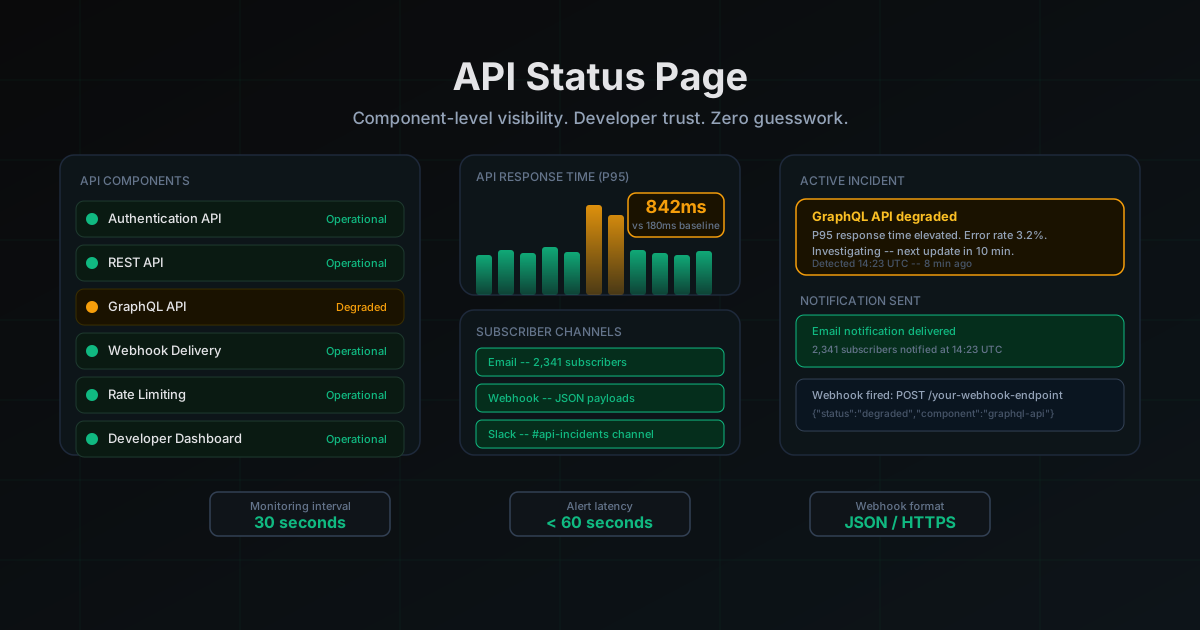
API endpoints by function, not by infrastructure. Don't list "Load Balancer 1" and "Load Balancer 2." List "Authentication API," "Webhooks Delivery," "REST API," "GraphQL API," "Rate Limiting," "Developer Dashboard." Your API consumers care about functional impact. Is the authentication endpoint slow? That affects every call they make. Is only the GraphQL endpoint degraded while REST is fine? That's useful information they can act on immediately.
Response time data, not just up/down. APIs have performance SLAs, not just availability SLAs. An API that's "up" but responding in 8 seconds instead of 200ms is broken for most use cases. Show response time trends. If your p95 response time is currently 2x your baseline, say so. Developers monitoring their systems will see the latency spike and come looking for answers. Give them the answer before they have to ask.
Error rate metrics. A 2% error rate might sound small, but for a developer making 100,000 API calls a day, that's 2,000 failed calls. Post error rate data when it's elevated. "Error rate for the Payments API is currently at 3.2%, up from our normal 0.1%. We're investigating." That's a useful update. It gives developers the data they need to decide whether to pause their API usage, queue requests, or trigger their own fallback logic.
Geographic breakdown. If you run infrastructure in multiple regions, region-specific status matters. An API outage in eu-west-1 is not the same as a global outage. If your US infrastructure is healthy but your EU API is degraded, developers with EU users need to know that specifically.
Maintenance windows. Planned maintenance is worse from a developer's perspective when it's a surprise. Post maintenance windows 48 to 72 hours in advance. Developers who see your maintenance notice can schedule their own deployments around it, set up maintenance mode in their apps, and avoid paging their on-call engineers unnecessarily.
Incident communication for API consumers
The way you communicate during an API incident determines whether your customers trust you or resent you. The standard for API providers is higher than for consumer products, because your customers are technical. They'll notice if your updates are vague, late, or inconsistent.
Here's what good API incident communication looks like:
First update within 5 minutes of detection. Not a root cause -- just an acknowledgment. "We're investigating elevated error rates on the Payments API. Impact appears isolated to authenticated POST requests. Next update in 10 minutes." That's enough. It tells the developer: you know something is wrong, you know roughly what's affected, and you'll be back with more information.
Specific error codes and affected endpoints. "Some users may experience issues" is useless to an API consumer. "Requests to POST /v1/charges are returning HTTP 503 at approximately 15% of calls" is actionable. Developers can filter their logs for those specific errors, alert their customers appropriately, and implement retry logic.
Root cause, immediately after resolution. Once an incident is resolved, post a brief root cause summary the same day. A full postmortem within 48 hours if it was significant. API developers integrate these into their decision-making. "That outage was caused by a database connection pool misconfiguration after a deploy. They've added automated rollback for connection pool issues." That's an incident that builds trust, not destroys it.
Webhook notifications and subscriber channels
A status page that requires developers to actively check it is about 30% as useful as it should be. The best API status pages push information to the people who need it.
Email subscriptions by component. Let developers subscribe only to the API components they actually use. A developer who uses your authentication API and webhooks doesn't need to be notified about degraded performance on your billing dashboard. Component-level subscriptions reduce notification fatigue, which means developers stay subscribed and actually read the alerts.
Webhook notifications. This is where API-focused status pages differentiate themselves. Let developers configure a webhook endpoint to receive status updates as JSON payloads. When you post an incident update, their systems get an HTTP POST with structured data. They can wire this into their own incident management systems, automatically create alerts in their monitoring tools, or trigger their own status page updates. Twilio does this. Stripe does this. If you're building for developers, this is expected.
Slack and Teams integration. Many developer teams have #incidents or #api-alerts Slack channels. Let them pipe your status updates directly in. One-click Slack subscription means the developer who set it up and every team member in that channel gets the alert. That's the kind of tooling that gets mentioned in "why we chose this API" blog posts.
LiveStatus supports all three: email subscriptions per component, outbound webhooks with JSON payloads, and Slack integration. You set it up once in your status page settings and it runs automatically for every incident update.
Public API for status data
If you're building for developers, consider one more thing: a public status API that lets developers query your status programmatically.
This looks like a simple endpoint: GET https://status.yourbrand.com/api/v1/status returning JSON that looks like:
{
  "status": "degraded",
  "components": [
    {
      "id": "payments-api",
      "name": "Payments API",
      "status": "degraded",
      "updated_at": "2026-04-18T14:23:00Z"
    },
    {
      "id": "auth-api",
      "name": "Auth API",
      "status": "operational",
      "updated_at": "2026-04-18T14:00:00Z"
    }
  ]
}
Sophisticated API consumers use this to build conditional logic into their systems. Before making a batch API call, check your status endpoint. If it's degraded, queue the batch for later. This reduces their error volume, reduces your error volume, and makes your API appear more reliable from an integration perspective.
It also makes your API feel like it was built by people who think about these things.
Real examples of what a status page prevents
The volume of support tickets that status pages eliminate during incidents is measurable. Here's what the ticket queue looks like without a status page:
A payment API goes down at 2 PM on a Tuesday. By 2:15, developers are emailing support: "Is your API down?" By 2:30, the tickets are coming in faster than support can respond. By 3 PM, there are 200 open tickets all asking the same question. Each one requires a human to respond. That's a support team spending 4 hours handling the communication side of a 45-minute incident.
With a status page and subscriber notifications: the API goes down at 2 PM. At 2:03, an incident is posted to the status page. At 2:04, email notifications go out to every subscribed developer. The ticket queue gets maybe 15 inquiries instead of 200, mostly from developers who weren't subscribed. Every ticket gets a one-sentence reply with a link to the status page.
That's not hypothetical. That's the actual math. And it compounds over every incident, every degradation, every maintenance window.
How to structure your API status page
Start with your highest-traffic, most critical API components. For most API providers, that's authentication, the core API endpoint, and webhook delivery. Get those monitored and visible first.
Add component-level monitoring that checks functional paths, not just infrastructure health. A monitor that just pings your API's health check endpoint and looks for a 200 misses the case where authentication is broken but the health check is on a public endpoint that doesn't require auth. Test the actual paths your customers use.
Use 30 or 60-second check intervals for your API endpoints. A 5-minute check interval means a 4-minute-59-second window where your API is down and your status page still says "operational." For APIs, that's unacceptable.
Set up multi-region monitoring. Your API might be fine in us-east but broken in eu-west. Your developers are global and they'll notice before you do if you're only monitoring from one location.
Connect your monitoring directly to your status page. The worst API status pages are the ones that say "All systems operational" while your error rates are spiking. Automated monitoring-to-status-page triggers mean your page reflects reality, not what someone remembered to update.
Getting started
If you don't have an API status page yet, start today. The setup takes less than 30 minutes. The ongoing maintenance is minimal. The trust signal it sends to every developer evaluating or using your API is immediate.
LiveStatus is built for exactly this use case: API monitoring, component-level status, subscriber notifications, webhook delivery, and a public status page on your own custom domain. The free tier covers small APIs. Paid plans add the features developer-focused status pages need.
Your competitors' API status pages are one Google search away from your prospects. Make sure yours is live.
More posts
The Best BetterStack Alternative in 2026: LiveStatus
Looking for a BetterStack or Statuspage alternative? LiveStatus gives you beautiful status pages and uptime monitoring without the enterprise price tag.
How a Status Page Cuts Support Tickets by 40%
The math behind how a status page reduces support ticket volume during incidents. Email subscribers, SMS alerts, proactive communication, and why the ROI shows up in your support metrics within the first incident.
How to Set Up a Custom Domain for Your Status Page
Step-by-step guide to setting up a custom domain for your status page. Why it matters, how to configure CNAME and SSL, and LiveStatus-specific instructions that get you live in under 10 minutes.